Strona jest chroniona przez reCAPTCHA.


SDPROG Diagnostic Software: Car License Activation Code
€25.00
Save money on mechanic visits. Diagnose your car and clear fault codes directly on your smartphone.
Dedicated software license for cars and light commercial vehicles in the SDPROG app (Android / iOS). The program diagnoses internal combustion engines (petrol/gasoline, diesel), hybrids, and electric vehicles compliant with standard OBDII protocols.
- Fault Code Diagnostic: Clear Check Engine lights and DTC codes.
- DPF Monitoring*: Track soot load levels and regeneration status.
- Adaptations & Service Resets*: Reset service intervals and perform component test procedures.
- English language: Clear DTC fault descriptions and repair guidance.
- Lifetime License: One-time purchase with free lifetime updates.
*Feature availability (DPF, adaptations, service resets) depends on the specific make, model, and year of the vehicle. This product does not include an OBD diagnostic scanner/interface.
Activation code is sent automatically via email upon purchase.
Not sure if it fits your car?
💳 Secure Payments ↩️ 14-Day Return Policy 🛡️ 100% Original Product 🚚 Fast shipping
Description
Who Is SDPROG For?
One app – targeted solutions for your exact needs.

Drivers & Car Owners
Full control over vehicle health, peace of mind, and savings on unnecessary mechanic visits.

Mechanics & Repair Shops
Instant scans during vehicle intake, accurate fault localization, and ready-to-use repair hints.

Used Car Buyers
An essential tool for verifying vehicle history on the used car market – no hidden defects or masked issues.
Check Compatibility with Your Car
Select your make, model, year, and engine to get 100% certainty before buying.

How Does SDPROG Car Diagnostics Work?
Car diagnostics in 3 simple steps – no expert skills required
1. Plug In
Plug in your scanner
Locate the OBD2 port in your vehicle and plug in the adapter.*
2. Launch
Launch the app
Open SDPROG on your smartphone or tablet and establish a connection.
3. Diagnose
Diagnose your car
You’re ready! View real-time parameters and clear fault codes.
*OBD scanner/interface is not included with this product.
Discover SDPROG Capabilities
Advanced OBD2 diagnostics made clean, simple, and intuitive.

Diagnostics & Code Clearing
DTC fault codes with English descriptions and status flags.

Real-Time (Live Data) Parameters
Monitor DPF status, exhaust gas temperatures, and engine metrics.

Full Vehicle Module Scanning
Comprehensive diagnostics for Engine, ABS, Airbag/SRS, etc.

All Features in One Place
Fast access to multi-system diagnostic capabilities from a single dashboard.

Broad Vehicle Coverage
Supports most passenger cars and light commercial vehicles.

Virtual Vehicle Garage Profile
Keep track of all your personal vehicles with maintenance reminders.
One Account, Full MySDPROG Ecosystem
Manage your licenses, paired devices, and community access in one place.

SDPROG Car License FAQ
Frequently asked questions about car diagnostics
How many vehicle makes are supported by the SDPROG license?
Can I diagnose multiple vehicles with a single software license?
Can I check DPF / FAP / GPF particulate filter parameters with SDPROG?
What is the difference between OBDII Mode and Service Mode?
How do I create an account using my license key?
Does the software work on Windows PC?
Package Contents
This product contains the SDPROG software license key only. Diagnostic hardware/OBD scanner is sold separately.

- SDPROG Lifetime Car Software License
Unlocks all supported cars in the SDPROG app - Android & iOS Mobile Application
Full access to diagnostic software for smartphones and tablets across both platforms. - Unlimited Free Updates
Ongoing access to new features, expanded DTC code databases, and live data parameters. - Activation Code & Customer Support
Quick online activation and English user manual
Looking for a complete kit with an OBD scanner?
Pair your software with a dedicated OBD diagnostic interface for fast, reliable data connection.

SDPROG Kit with Dedicated OBD Scanner
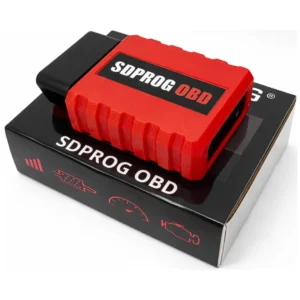
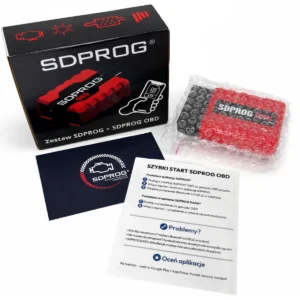
Choose a turnkey diagnostic solution free of compatibility issues. Getting the license bundled with the official SDPROG OBD scanner guarantees stable connectivity, quick pairing, and fast real-time engine parameter readings.
Do you own a BAIC / Chevrolet / Ford / Opel / Mazda / Saab vehicle? Choose the SDPROG OBD PRO Kit, which supports additional CAN protocols used by these manufacturers.
Check the SDPROG OBD PRO Kit
Check the SDPROG OBD PRO Kit
3 reviews for SDPROG Diagnostic Software: Car License Activation Code
| 5 star | 63% | |
| 4 star | 9% | |
| 3 star | 11% | |
| 2 star | 3% | |
| 1 star | 11% |
Only logged in customers who have purchased this product may leave a review.




Mariusz –
Działa poprawnie, wszystko ok.
WŁADYSŁAW RENIK –
Anonyme –